
The Independent Math Practice Struggle Is Real
If you’ve ever thought, “Small groups sound great in theory… but what do the other kids do for independent math practice while I’m pulling them?”—you’re not alone.
In my early years of teaching, I went all in on centers. I had task cards, games, laminated activities, and enough copies to rival the school’s paper budget. Each standard had a bin. Each bin had a system. Each system… required hours of prep every Sunday.
Sound familiar?
Eventually, I stepped away from traditional centers. Rotations felt overwhelming to manage and unsustainable to prep. But even without them, one big challenge remained: how to give my students meaningful, independent math practice that didn’t involve drill-and-kill worksheets or constant micromanaging.
That’s when I discovered pixel art math—and everything changed.
In this post, I’m breaking down:
- Why so many independent math practice routines don’t work
- How pixel art became my no-prep secret weapon
- What’s inside my freebie (yes, you can try it!)
- And why this simple shift can totally transform your math block
Let’s make independent practice actually work—for your students and your sanity.
Why Traditional Independent Math Practice Doesn’t Work in Upper Elementary
There’s this moment every teacher dreads.
You’ve finally pulled a small group to work with—and three minutes in, a hand shoots up.
“Miss, I’m done.”
You glance at their paper. Three answers. Half effort. Zero stamina.
Meanwhile, another student is whispering to a friend, one’s asking for help on problem two, and two more are silently staring at their blank page because… they don’t even know where to start.
This is the reality of traditional independent practice in upper elementary.
Worksheets? Kids rush through or shut down.
Games and centers? They’re fun—but take hours to prep.
Task cards? Great in theory… if you laminated them last summer.
And while small group instruction is the gold standard, the real challenge is:
What are the rest of your students doing while you teach?
The Three Big Problems with Traditional Independent Math Practice
1. It’s either boring or overstimulating—nothing in between.
Repetitive worksheets don’t spark engagement. And while interactive centers can be fun, they often lead to off-task behavior if not perfectly structured.
2. It requires a ton of prep to feel “worth it.”
Creating meaningful centers for every math skill? That’s a full-time job. When I used to plan out rotations for every standard, I felt like I was spending more time prepping materials than actually teaching.
3. It doesn’t support independence.
If the activity isn’t self-checking, students either wait on you… or guess their way through. Cue a trail of low-quality work and constant interruptions during your small group time.
Let’s be honest:
- “Do I have to do all of these?”
- “Can I be done now?”
- “I don’t get it.”
Those phrases were on repeat in my classroom until I found something that actually worked.
Wait, What’s Pixel Art Math?
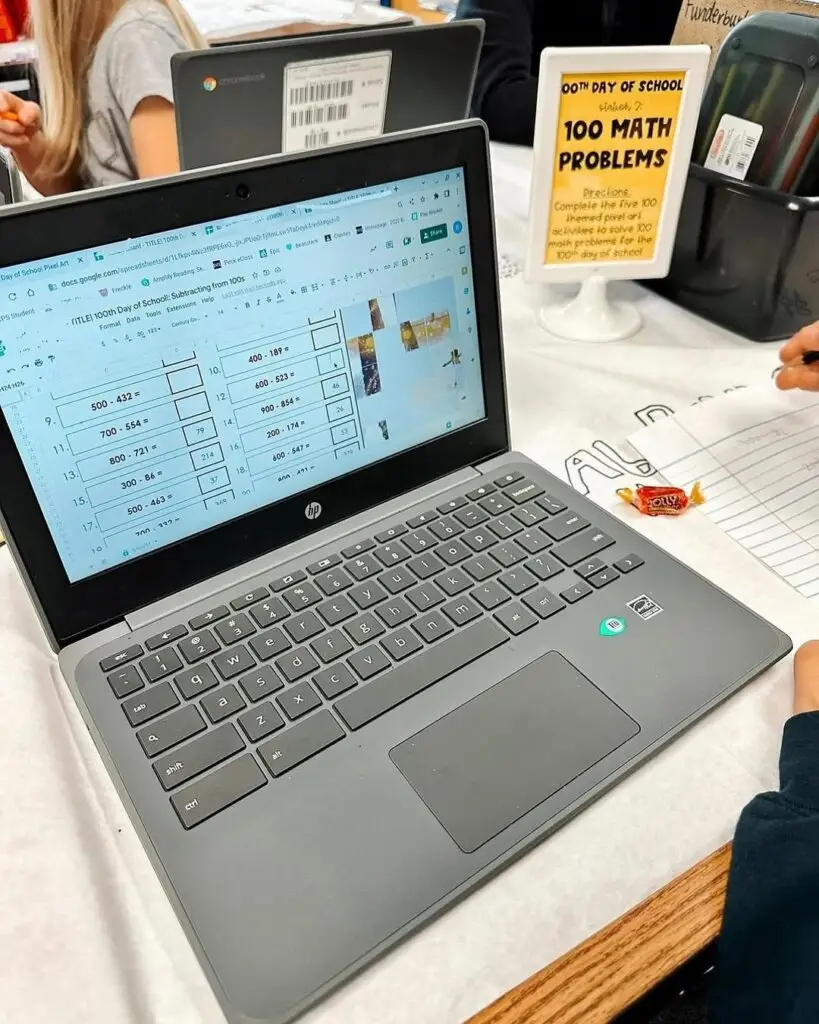
Imagine if your students asked to do more math review… and you didn’t have to grade a single problem.
That’s what makes pixel art math so powerful. It’s a self-checking digital activity that blends essential skill practice with built-in motivation—and it doesn’t require hours of prep on your part.
Here’s how it works:
- Students open a Google Sheets™ file with grade-level math problems.
- Each correct answer reveals a small part of a mystery picture.
- As they keep solving, the image gradually appears.
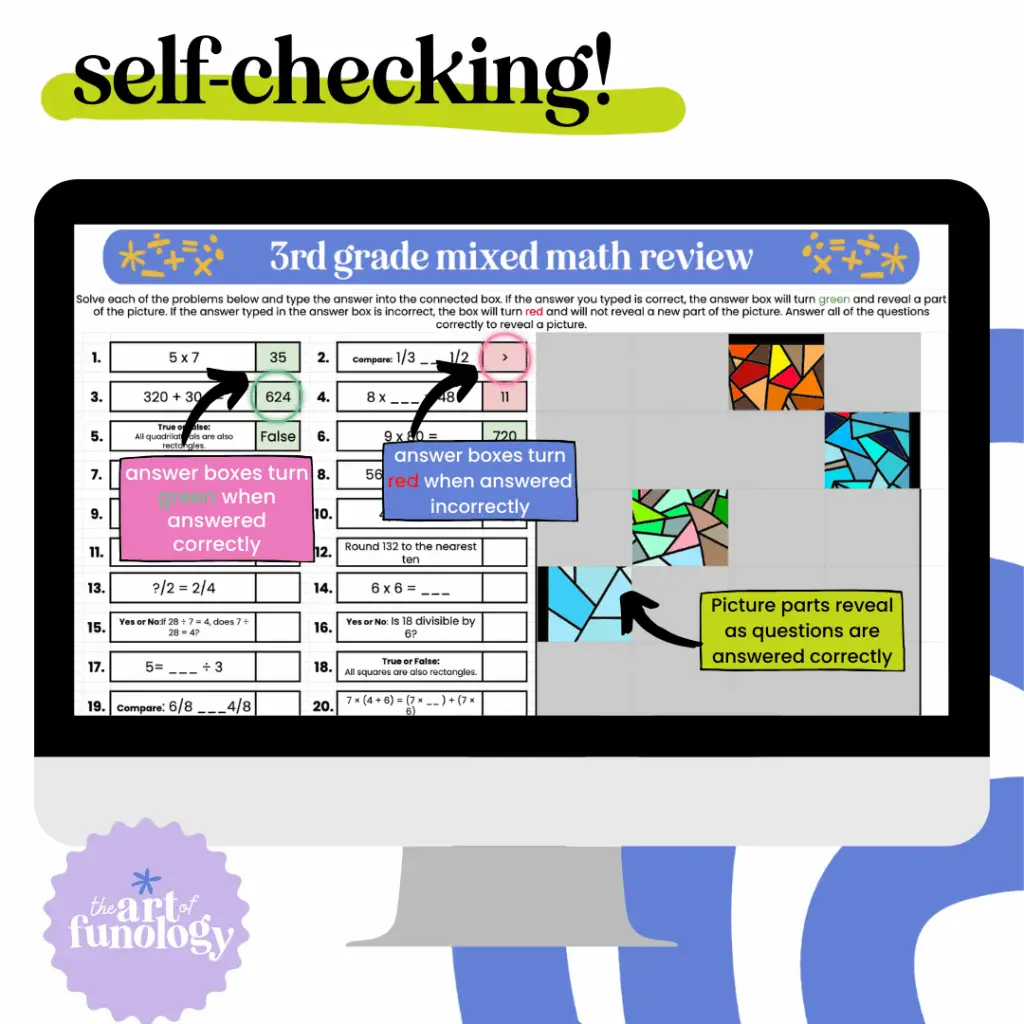
- If they enter an incorrect answer, nothing shows up—so they know to double-check their work.
It’s part game, part math, and part digital puzzle. The result? A classroom full of focused students, all working independently, without the usual chaos or hand-raising.
Why It Works So Well for Independent Math Practice
Pixel art math completely changes the vibe of practice time:
- Students stay engaged because they want to reveal the full image.
- You don’t have to walk around checking answers or explaining directions over and over.
- There’s no printing, cutting, or laminating—just assign and go.
It also fits seamlessly into digital platforms you’re probably already using. Pixel art activities can be shared directly through Google Classroom, making them ideal for 1:1 or hybrid settings. Students simply open the file, start solving, and get immediate feedback as they go.
What used to feel like a constant juggling act becomes a calm, productive work session. You can actually focus on small group instruction while the rest of your class is on task—and even enjoying it.
How Pixel Art Saved My Sanity One Friday Afternoon
Okay, let me set the scene.
It was a Friday. We were deep in test prep season, and I had a group of 5th graders who were done. Like mentally checked out, zero motivation, “do we have to do math again?” level done.
I needed to pull a few kids for reteaching—multiplying fractions and mixed numbers—but the rest of the class? I honestly just needed them to stay busy, on-task, and preferably not setting anything on fire.
So I opened Google Classroom, assigned one of my pixel art activities, and hoped it would at least keep them quiet for ten minutes.
And then… the magic started.
Instead of, “Ms. Ecker, I’m done!” or “I don’t get it,” I heard:
- “Wait—I think it’s turning into a dog.”
- “No way, it’s a cat. Look at the ears!”
- “Can I do another one when I finish?”
I didn’t answer a single question. Not one. They were checking their own work, fixing mistakes, and actually trying because they wanted to see the picture reveal.
And of course—that’s when my principal walked in.
I was mid-small group. Every other kid was focused, quiet, and working. She stayed for a bit, nodded, and said, “Whatever this is, it’s working.”
Y’all. It was pixel art.
I’ve used it for review, for math centers, for sub days, for “my brain is fried and I need a win” days. Every time, same result: engaged students, a calmer room, and me not losing my mind.
It’s truly an engaging math review idea that feels like a cheat code—except it’s not. It’s just smart.
What’s Inside the Freebie (and Why It’s a Total Lifesaver)
Let’s talk about what you’re getting in this free pixel art download—and why it’s become one of my favorite tools for independent math practice.
This is a self-checking, digital activity created specifically for 2nd–5th grade classrooms. It’s perfect for review, fluency practice, sub days, or those “please just work quietly” moments we all have.
Here’s what’s included:
✅ Grade-level options for 2nd, 3rd, 4th, and 5th grade
Each version targets developmentally appropriate math skills that actually align with what your students are learning.
✅ Skill-focused practice that doesn’t feel like a worksheet
We’re talking everything from two-digit addition to multiplying fractions—without the drill-and-kill vibe. (Curious what each grade gets? I break it all down on the opt-in page!)
✅ Digital Google Sheets™ format
Assign it in Google Classroom in seconds. It works beautifully on Chromebooks and desktops, and there’s nothing to print or prep.
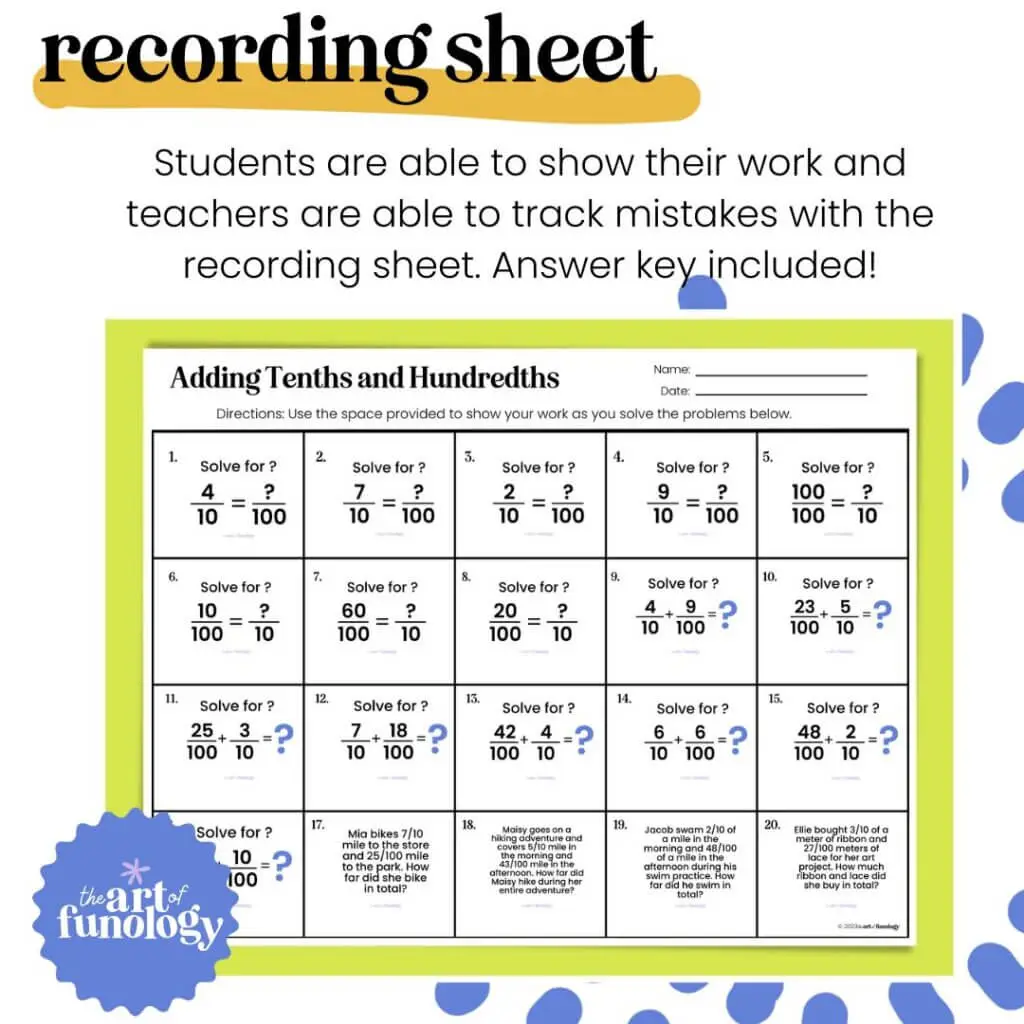
✅ Printable recording sheets included
Need to hold students accountable or prefer a paper option? Each activity also comes with a printable version so students can show their work or complete it offline.
✅ Self-checking = less hand-raising, more independence
Wrong answers won’t reveal a pixel, so students pause, re-check, and fix mistakes on their own.
✅ Fun, focused, and just the right amount of novelty
The mystery image adds just enough gamification to keep even reluctant learners hooked.
Click here to grab your free pixel art activity and see exactly what’s included for your grade. You’ll also get fresh ideas and exclusive freebies delivered straight to your inbox—because you deserve resources that actually work.
Why Pixel Art Is a Game-Changer for Independent Math Practice
You don’t need more fluff. You need something that actually works.
Pixel art isn’t just cute—it’s strategic. Here’s why it works so well in upper elementary classrooms:
✅ Built-In Motivation
Students aren’t just solving problems… they’re revealing a mystery image one correct answer at a time. That simple twist turns ordinary practice into a challenge they want to finish.
Even reluctant learners stay engaged because the picture reveal gives them something to work toward—without external rewards or constant redirection.
“My students literally beg for these.”
—Ms. Garcia, 3rd Grade Teacher
✅ Self-Checking = Less Hand-Raising, More Independence
Pixel art activities check themselves. If an answer is wrong, the pixel doesn’t appear. No need for you to stop your small group instruction to review every problem—they get immediate feedback and fix errors on their own.
“Good way to practice the skill and get ready for state testing.”
—Ashley D., 5th Grade Teacher
✅ Digital—but Easy (With a Paper Option, Too)
No fancy platforms. No steep learning curve. Just a Google Sheets™ file that works beautifully on Chromebooks and desktops. If you can assign something in Google Classroom, you can use pixel art.
Want to add a layer of accountability? Every activity also comes with printable recording sheets so students can show their work as they solve—or complete the assignment offline if needed.
You get the best of both worlds: the ease of digital with the flexibility of paper.
✅ Versatile Use Cases
Pixel art is your new secret weapon for:
- Math centers
- Spiral review
- Sub plans
- Homework
- Early finisher work
- Test prep
Because it’s self-directed and engaging, you can plug it into any part of your math block and trust it’ll hold your students’ focus.
“My principal walked in and I was so happy to see him see my kids so engaged in math!”
—Taylor F., 5th Grade Teacher
✅ Truly Prep-Free
Print? Nope. Cut? Nope. Laminate? Never again.
With pixel art, there’s no setup. Just assign the file and go. It’s the easiest way to add standards-aligned practice to your week without adding one more thing to your to-do list.
Before: You spend Sunday night prepping center bins.
After: You assign pixel art in two clicks and enjoy your coffee.
📸 [Insert optional comparison image: messy center prep vs. clean digital screen]
💬 [Consider a short blurb graphic with the “beg for these” or “principal walked in” quote]
Frequently Asked Questions About Pixel Art Math for Independent Math
Got questions? Totally fair. Here’s what teachers usually ask before trying pixel art for the first time.
Can I use this if I’m not tech-savvy?
Absolutely. If you can open a Google Sheet and assign something in Google Classroom, you’re golden.
There’s no fancy platform or tricky setup involved. Plus, your download comes with clear directions to make it plug-and-play—even if you don’t consider yourself “techy.”
✅ Digital math practice for Google Sheets without the stress? Yes, please.
Will this work for students below grade level?
Yes! While the freebie is aligned to grade-level standards, many teachers use pixel art for review, intervention, or small group practice.
Because it’s self-paced and self-checking, students can work through it with more confidence—and you’ll know exactly where they need support based on which parts don’t “light up.”
Bonus: The printable recording sheets can be great for guided practice or scaffolding!
What devices do students need?
Pixel art activities are designed to work on any device that supports Google Sheets—Chromebooks, desktops, and most laptops.
Tablets can work too, but for the best experience, a keyboard-friendly device is ideal.
Is this freebie differentiated?
While each grade level version targets a specific skill, the activity itself is great for mixed-ability classrooms. You can pair it with support tools (like manipulatives or anchor charts), and let students work at their own pace.
Where can I get more pixel art?
So glad you asked! 😄 You can find my full collection of pixel art math activities for 2nd–5th grade right here in my TPT store.
Whether you want full-year bundles, domain-specific packs, or seasonal sets, there’s something for every classroom.
✅ Already loving the free pixel art math download? This is just the beginning.
Ready to Try Pixel Art in Your Classroom for Independent Math Practice?

You’ve seen how it works, what’s included, and why teachers (and principals!) love it. If you’re looking for a way to:
✨ Reduce classroom chaos
✨ Keep students engaged without constant oversight
✨ Actually enjoy your small group time again
Then this free pixel art activity is for you.
Whether you use it for review, early finisher work, or your go-to sub plan, you’ll love how easy it is to assign and how focused your students are when they’re working on it.
Click here to grab your free pixel art download and try it with your class this week.
You’ll also get exclusive pixel art resources, teaching tips, and bundle discounts delivered straight to your inbox.
Low-prep. High-impact. Totally teacher-approved. Let’s make independent practice something you actually look forward to.
Why Pixel Art Math Works for Independent Math Practice (and Not Just Because It’s Fun)
At the end of the day, you don’t need to reinvent the wheel every week.
You just need strategies that work—for your students, and for you.
Pixel art might look fun (and it is), but it’s also built on best practices:
✅ Self-checking = immediate feedback
✅ Low-stakes challenge = higher engagement
✅ Repetition = deeper skill retention
And the best part? You can use it again and again throughout the year without sacrificing rigor, time, or your sanity.
If you’ve been searching for an independent math practice activity that actually works, this is it.
So here’s your next step:
- Grab the freebie.
- Try it with your class.
- Watch the focus and motivation kick in.
- Then when you’re ready for more, come grab the full-year pixel art bundle and keep that magic going all year long.
You’ve got enough on your plate. Let pixel art take something off it.